Technology & Telematics · Driver Training VideoUsing Your ELD App
The ELD records what already happened, so the app should be learned before a roadside inspection. Drivers learn duty statuses, unassigned driving events, personal conveyance, and daily certification.
 Branded with your logo & company name
What drivers learn
The ELD isn't there to catch you. It's there to record exactly what already happened — so learn the app before your first real shift, not during a roadside inspection.
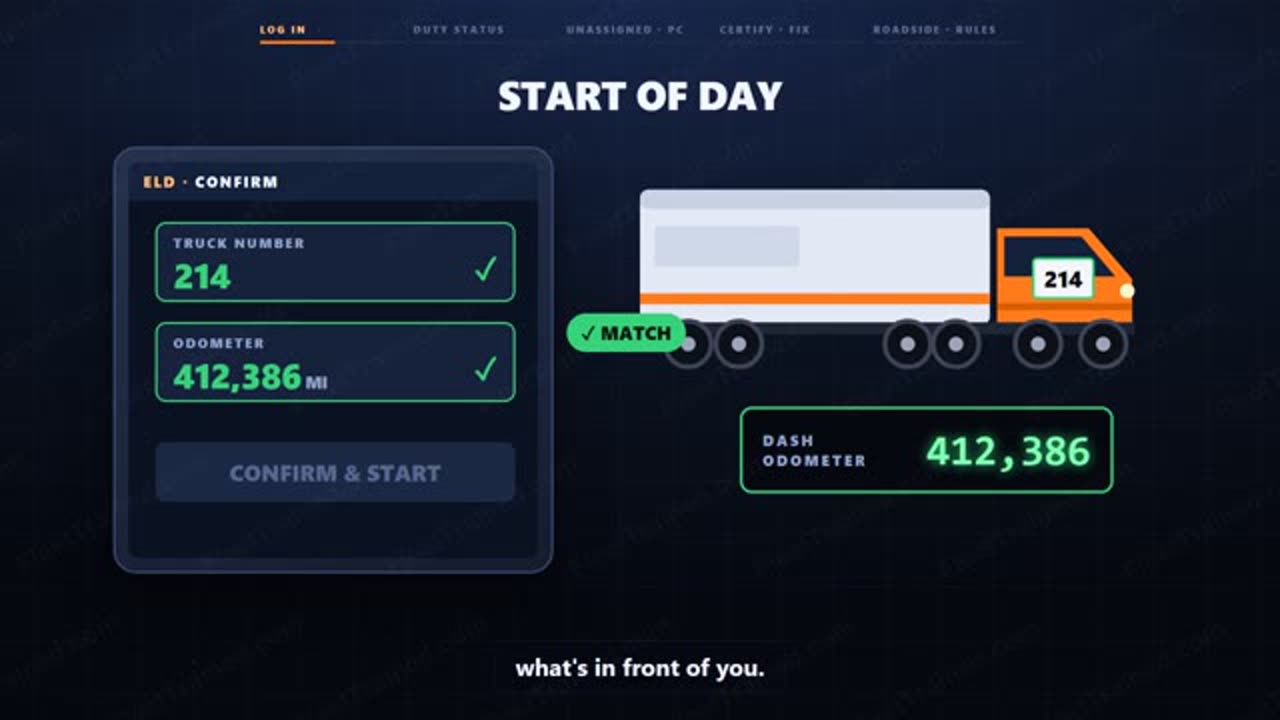
Start of day: log in, select your vehicle, and confirm the odometer and truck number match what's in front of you. A mismatch here follows you for the whole shift, so fix it before you move, not after.
Duty status is the core of the app — usually four buttons: off duty, sleeper berth, driving, and on-duty not driving. The app switches you to driving automatically once the wheels roll above a set speed, but you still have to set every other status yourself.
Know your unassigned driving events
If the truck moves without a driver logged in — a yard move, someone else behind the wheel — the ELD records it as unassigned time. At your next login, the app will ask you to claim it or certify it isn't yours.
Personal conveyance moves the truck without counting against your clock, but only for personal reasons — not one inch toward a shipper or receiver. Select it before you move, not after you've already started driving, and be ready to explain the trip if you're asked.
Certify your log every single day, even on a day off. An uncertified log is a violation on its own, and log violations are one of the fastest ways to turn a routine inspection into a bad one.
Malfunctions happen
If the app shows a malfunction icon, don't panic and don't ignore it — note the malfunction, tell your safety department right away, and switch to paper logs. Rebuild the last seven days on paper if you can't pull them up, and stay on paper until it's fixed.
At a roadside inspection, hand the officer your login screen or use the app's data transfer function — don't hand over your personal phone unlocked to everything else on it.
Sample quiz questions
3 of the 10 questions drivers answer after the video. Quizzes run in the driver's own language.
- To catch drivers breaking the rules
- To automatically dispatch loads
- To record exactly what already happened
- To track fuel efficiency
Show answer
To record exactly what already happened
- Fix it before you move, since the mismatch follows you the whole shift otherwise
- Note it and fix it after your shift
- Ignore it if you're running late
- Report it only if dispatch asks
Show answer
Fix it before you move, since the mismatch follows you the whole shift otherwise
- Three
- Five
- Six
- Four
Show answer
Four
How fleets use this training
Pick Using Your ELD App and send each driver a personal link by email, or copy the link and text it yourself.
Drivers watch on their phone and answer the quiz in their own language. No app, no login.
They sign on screen and get a certificate with your logo. Every completion is saved for DOT and insurance.
Train your drivers on Using Your ELD App
Included in the Full Library plan ($129.99/mo, unlimited drivers). Unlimited drivers, cancel anytime. Prefer to own it? Order it branded for $4.99, one time.
Frequently asked questions
How long is the Using Your ELD App training video?
About 3 min. Drivers watch it on their phone from a personal link, then take a 10-question quiz.
Is there a quiz and a completion certificate?
Yes. Every driver takes a 10-question quiz in their own language, signs on screen, and gets a completion certificate with your company name and logo. Records are saved for DOT audits and insurance.
Which languages is it available in?
Ready today in English. You can also order it branded in any other language for $2.99 per extra language.
How much does it cost?
Included in the Full Library plan ($129.99/mo, unlimited drivers). You can also order this video branded with your logo and company name in the voiceover for a one-time $4.99, yours to keep.